 RightoraRightora
Bring everyday file actions to Finder's context menu. Core enhancements are free forever; upgrade to Pro for image, video, PDF, and automation tools.
Copy paths, move files, and work with images beside the selected file. This illustration shows part of the menu added by Rightora.
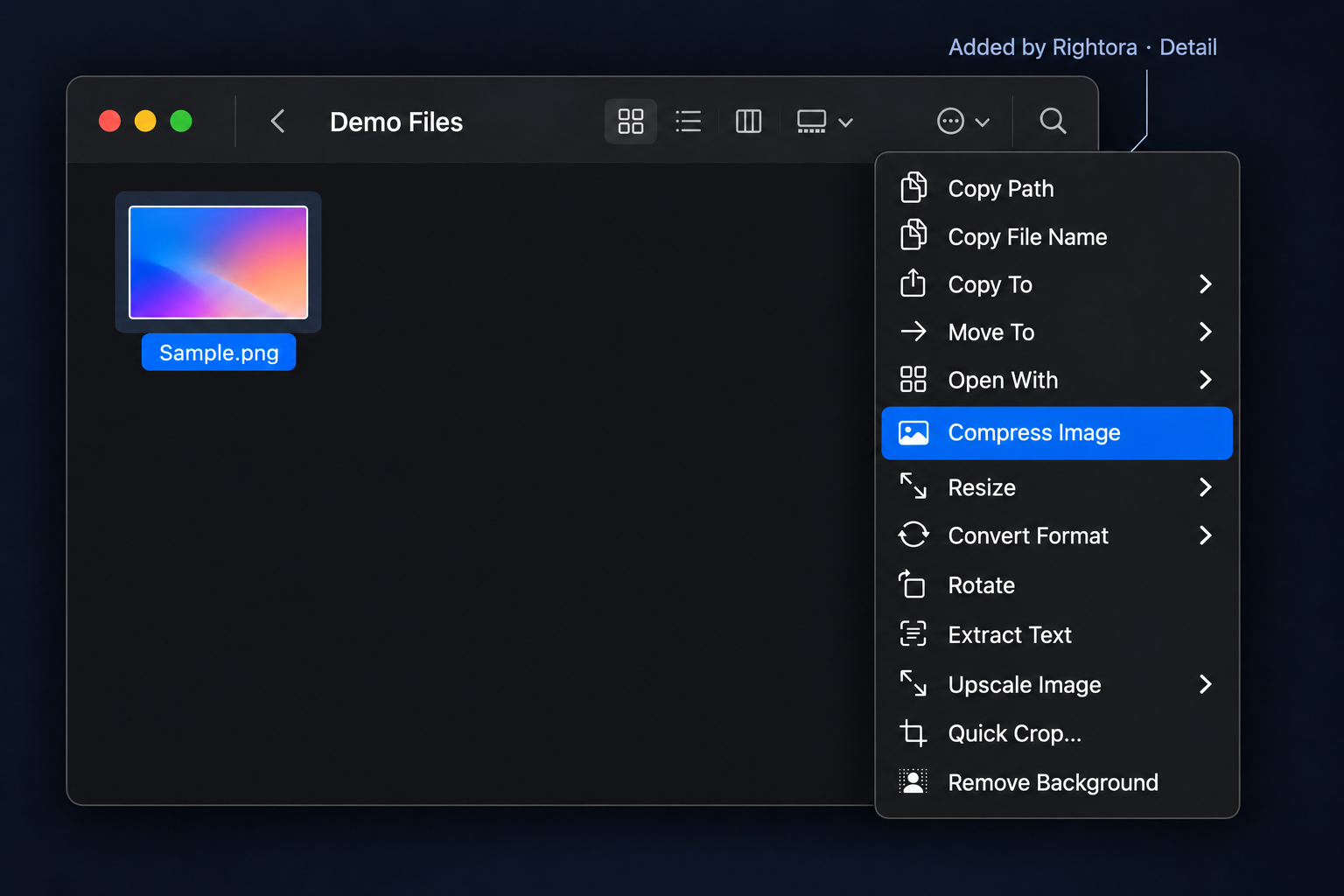
Rotating an image, extracting its text with OCR and scanning QR codes are free forever. Rightora Pro adds compression, format conversion, resizing, cropping, background removal, metadata stripping, upscaling and batch processing.
A professional processing engine shrinks images further, across a whole selection.
Quick conversion between JPEG, PNG, HEIC, TIFF, AVIF, WebP and more.
Subject detection runs on your Mac and writes a transparent image; works across a selection.
Media info and cover frames are free forever. Rightora Pro provides the full set: video compression, format conversion, audio extraction, GIFs, frame grabs, merging and speech to text.
Make a GIF straight from the Finder menu, without opening a separate video editor.
Pull the audio out of a video quickly, in the common audio formats.
On-device recognition writes a .txt transcript or .srt subtitles. Nothing leaves your Mac.
Documents and PDF: Rightora Pro merges PDFs, compresses them, turns Office files into PDFs and converts between document formats — all from the Finder menu.
Archives: Packing to ZIP and tar.gz, and extracting the common formats, are free forever. Pro adds encrypted archives and split volumes.
Everyday packing and extraction, here or into a folder of its own, plus viewing what's inside.
Password-protected ZIP and 100 MB–2 GB volumes.
Merge and compress PDFs, Office to PDF, and Markdown / docx / HTML / EPUB conversion.
Configure actions for blank areas, folders, and files, then adjust their order and parameters.
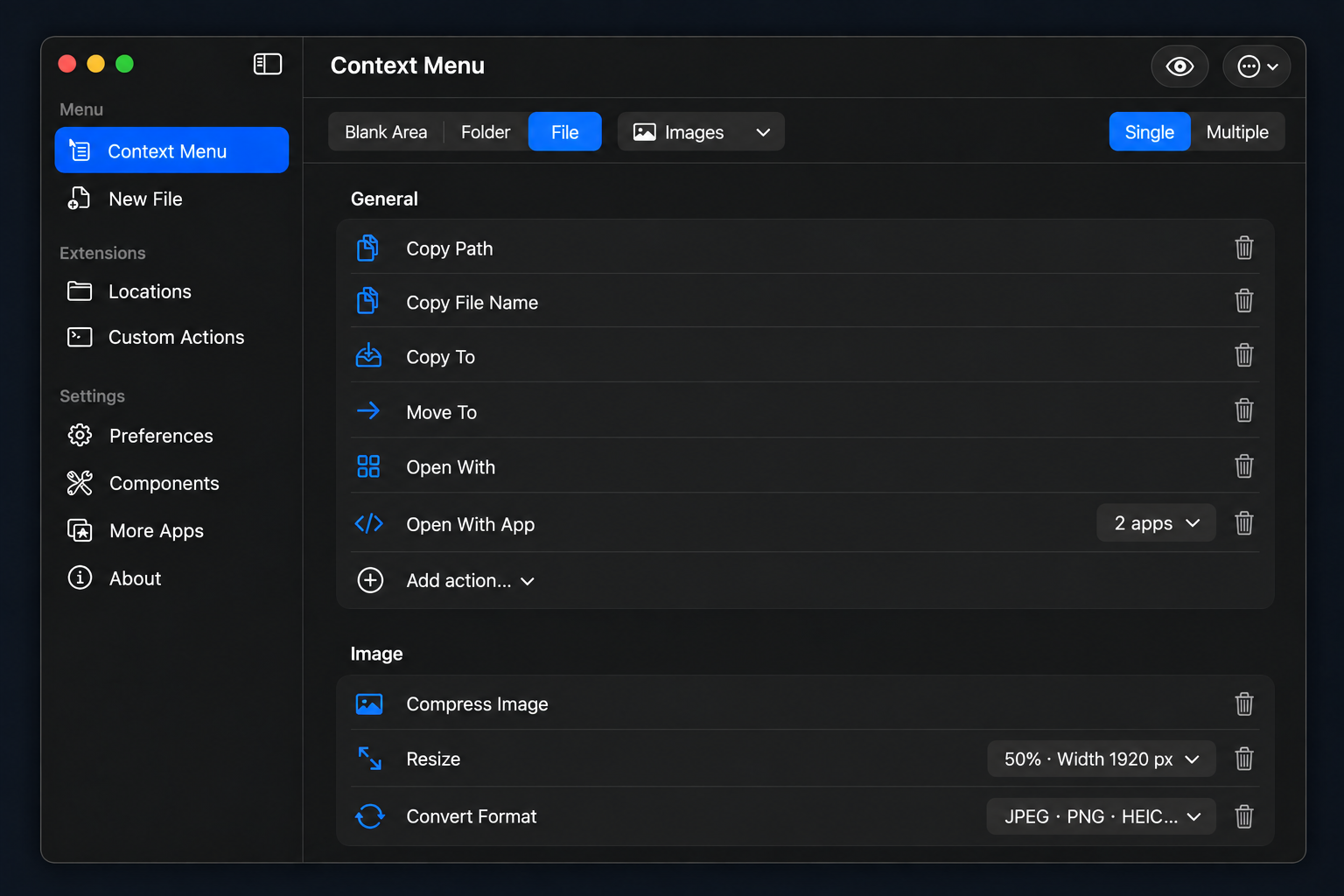
Install the processing components you need for images, video, PDFs, archives, and documents, managed by Rightora.
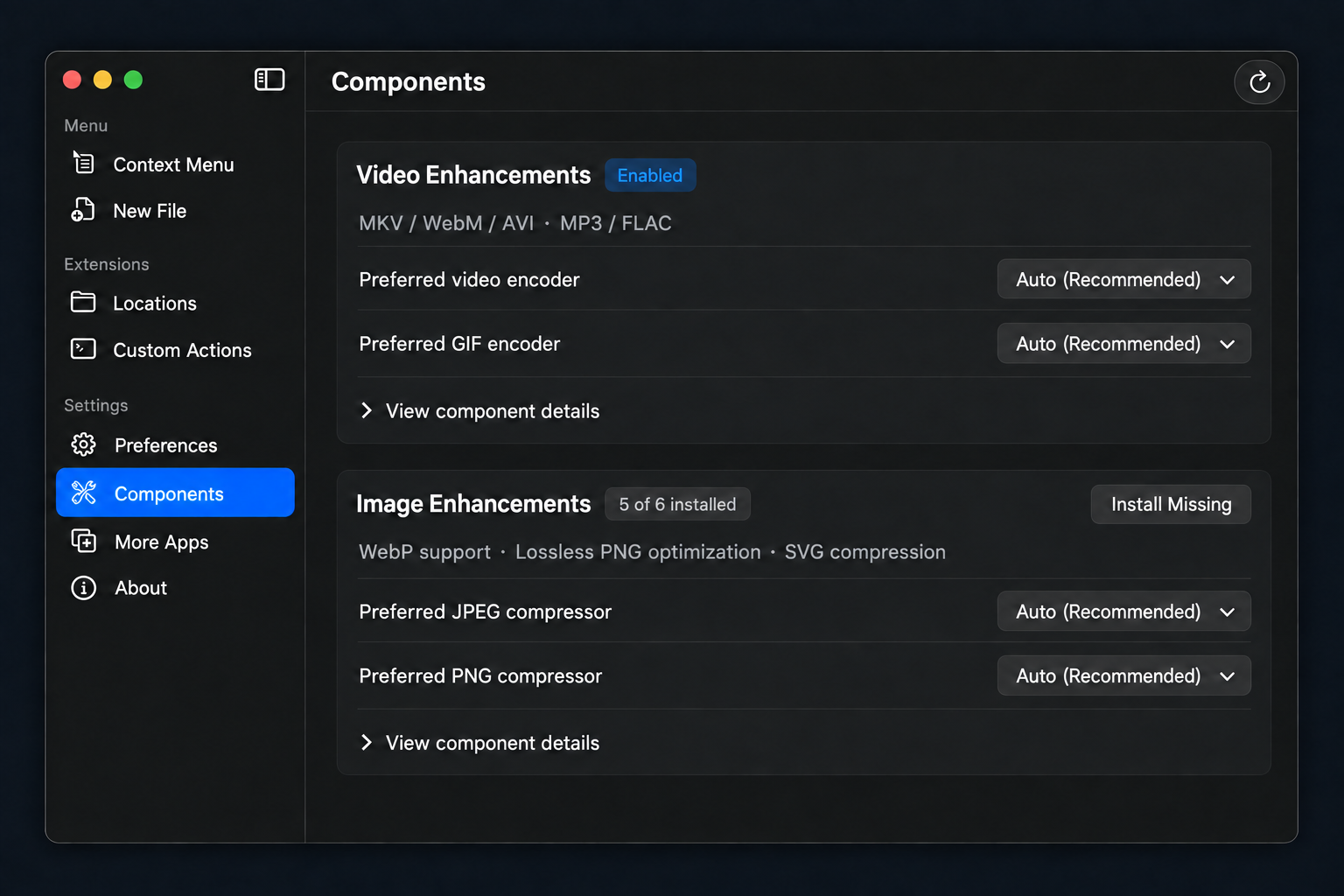
Some actions need their component installed; each one installs in a click from the Components page, with no command-line setup.
Free is a complete Finder right-click toolkit. Pro is the file processing, batch and automation toolbox.
Free has no usage limits and needs no account.
A complete Finder right-click toolkit · no usage limits
The file processing and automation toolbox · everything in Free included
A 14-day full Pro trial; when it ends, the Free features stay free forever.
Free has no usage limits. Upgrade when you actually need image, video and PDF processing, batches and automation.
No auto-renewal. No forced login. Lifetime includes all future updates.
Install Rightora, then enable it under System Settings › Login Items & Extensions › Finder extensions. A Quick Actions group appears in the right-click menu. Which entries show up, and in what order, is entirely up to you in Rightora's Menu page.
Select several files, right-click and choose Batch Rename. Find and replace, prefixes, suffixes, numbering, dates and regular expressions are all supported, with a live preview and conflict detection before anything is written.
Right-click an image and choose Compress Image or Convert Format, covering JPEG, PNG, HEIC, TIFF, AVIF, WebP and more, across a whole selection if you like. These are Rightora Pro file-processing features, and the 14-day Pro trial covers all of them.
Right-click the video and pick Video to GIF or Extract Audio. These are Rightora Pro media features, and Pro can install the FFmpeg professional processing component on demand for more media formats and stronger processing.
No. The menu changes with what you right-click, so an image only shows image actions. Every entry can be removed or reordered, and you can turn on automatic tidying so anything unused for 30 days moves into a More submenu.
In one line: Free completes Finder; Pro is the file processing and automation toolbox. Anything that doesn't produce a new file is free forever — new files and templates, Terminal / editor / app launchers, copy path and filename, copy/move to, favorite locations, packing to ZIP and tar.gz and extracting the common formats, hashes, file info, folder size, directory trees, symlinks, hidden files, OCR, QR codes, media info, cover frames, rotating an image, and the Shotora and AppPermit entries. Image processing, video and audio, PDF and document conversion, advanced archives, batch rename, custom actions, professional components are Rightora Pro.
No. Everything runs locally on your Mac and no file ever leaves it. Edits are written to a temporary file and swapped atomically, and deletions only ever go to the Trash.
It is free forever, and there are no usage limits of any kind. The free tier is a complete Finder right-click toolkit in its own right, and Rightora never charges per action.
Rightora Pro features are free to try for 14 days. When the trial ends Rightora keeps working — the Free features stay free forever, and only file processing, batches and automation need an upgrade.
No auto-renewal. Choose $3.99/yr (a one-time purchase covering a year) or $8.99 once for life, updates included.
The whole file processing and automation toolbox: image compression and conversion, video and audio processing, PDF and document conversion, encrypted and split archives, batch rename and your own script actions — all of it runnable across a selection, with a cancellable progress panel, a failure report and a conflict policy for same-named files. Pro can also install professional processing components such as FFmpeg, pngquant, Ghostscript, 7-Zip and pandoc for richer formats and stronger processing.
Rightora manages them for you: one click on the Professional Components page, with no command-line setup. Each one is downloaded from its official release location and verified against its SHA-256 before installation, and you can point Rightora at a copy you already have. Office-to-PDF relies on LibreOffice, which Rightora detects but never installs for you.
A licence activates one Mac at a time. You can deactivate a device from the About page and move the licence to another machine.
Yes — within 14 days of purchase, no questions asked. Email us with your order number; see the refund policy.